Summary: Application security tools find and fix risks across the software lifecycle—in code, dependencies, APIs and pipelines. Best for all-round web app and API protection: Radware; plus SonarQube (SAST), Snyk (open source) and ZAP (free DAST).
What Are Application Security Tools?
Application security (AppSec) tools are designed to identify and mitigate risks within software applications throughout their lifecycle. These tools help organizations secure their applications by addressing vulnerabilities in code, dependencies, APIs, and deployment pipelines.
Common types of AppSec tools include:
- Web Application and API Protection (WAAP): WAAP solutions extend WAF capabilities to secure both web apps and APIs against a broad range of attacks, including injection flaws, bot abuse, and DDoS events. Examples include Radware, F5, and AppTrana.
- AI Security: AI security tools help protect applications that leverage artificial intelligence, addressing unique risks such as prompt injection, data poisoning, and adversarial input attacks.
- Static Application Security Testing (SAST): SAST tools analyze source code to identify vulnerabilities before runtime. Examples include SonarQube, Checkmarx, and Veracode.
- Dynamic Application Security Testing (DAST): DAST tools test applications in a running state, simulating real-world attacks. OWASP ZAP, Burp Suite, and Acunetix are examples of DAST tools.
- Interactive Application Security Testing (IAST): IAST tools analyze applications from within while they run, combining static and dynamic techniques to provide precise, real-time vulnerability detection. Examples include Acunetix with AcuSensor, Black Duck Seeker, and Aikido.
- Software Composition Analysis (SCA): SCA tools identify vulnerabilities in open-source and third-party libraries. Black Duck and Snyk are examples of SCA tools.
- Kubernetes Web Application Firewalls (WAFs): Kubernetes WAFs protect containerized workloads inside Kubernetes clusters by filtering and inspecting HTTP traffic to block common web threats. Examples include Radware Kubernetes WAF, Prophaze, and Calico.
Editor’s note: This article has been updated with recent application security market data, information about AI security, and updated descriptions for security tools, reflecting features and capabilities in 2026.
In this article:
The table below summarizes the key differences between the application security tools covered in this article. We explore each of them in more detail in the sections that follow.
| Category |
ソリューション |
Best For |
Key Strengths |
Things to Consider |
| WAAP |
Radware WAAP |
Unified, AI-driven web app and API protection across environments |
WAF, API, bot, client-side and L7 DDoS in one platform |
Advanced rules and reporting have a learning curve |
| WAAP |
F5 |
Consolidating WAF, API, bot and DDoS across hybrid multicloud |
Integrated WAAP with broad deployment options |
Complex configuration; needs a dedicated administrator |
| WAAP |
AppTrana |
Fully managed WAAP with built-in vulnerability remediation |
Managed SOC, virtual patching, DAST-fed protection |
Reporting window and custom rules are limited |
| SAST |
SonarQube |
Deep static code review integrated into CI/CD pipelines |
Taint and dataflow analysis with IDE and CI/CD feedback |
False positives; advanced editions cost more |
| SAST |
Semgrep |
Fast, developer-first SAST with reduced noise |
Rule-based plus AI detection with in-PR remediation |
Custom-rule syntax has a learning curve |
| SAST |
Mend |
SAST embedded directly in developer repositories |
Pre-commit scanning with AI-assisted fixes |
Integrations and interface can be challenging |
| DAST |
ZAP (Zed Attack Proxy) |
Free, open-source dynamic testing and manual pentesting |
Intercepting proxy with active and passive scans |
Community support; interface feels dated |
| DAST |
Rapid7 InsightAppSec |
Scalable black-box testing of web apps and APIs |
Automated DAST with attack replay and DevOps integration |
False positives; scans can be slow |
| DAST |
Checkmarx DAST |
DAST inside CI/CD with API coverage |
Tunneling onboarding, auth-aware scans, API testing |
Sold within Checkmarx One; pricing is complex |
| IAST |
Acunetix |
Grey-box scanning with runtime code visibility |
AcuSensor pinpoints code; broad API testing |
Per-target licensing; deep scans can be slow |
| IAST |
Black Duck Seeker |
IAST with active verification and data tracking |
Verifies findings, tracks sensitive data, CI/CD fit |
Heavy footprint; premium pricing |
| IAST |
Aikido |
All-in-one AppSec across code, cloud and runtime |
SAST, SCA, DAST, secrets and runtime in one platform |
Noisy first setup; scans slow on large repos |
| SCA |
Sonatype Lifecycle |
Automated open-source dependency governance |
Policy engine, contextual prioritization and SBOMs |
Alert volume; strongest for Java ecosystems |
| SCA |
Checkmarx SCA |
Open-source risk with reachability analysis |
Transitive scanning and malicious-package detection |
Pricing; scans can be slow |
| SCA |
Snyk |
Developer-first open-source dependency fixes |
IDE and CI integration with risk scoring and fix PRs |
False positives; pricing on higher tiers |
| Kubernetes WAF |
ラドウェアKubernetes WAF |
Kubernetes-native application protection in CI/CD |
Scales with pods, auto-generated policies, OWASP coverage |
Interface has a learning curve for new users |
| Kubernetes WAF |
Prophaze |
In-cluster, no-sidecar Layer 7 protection |
Helm deploy, AI detection, east-west coverage |
Reporting and dashboards are limited |
| Kubernetes WAF |
Calico |
Workload-level WAF inside Kubernetes clusters |
Ingress and east-west inspection with microsegmentation |
Steep learning curve; needs networking skills |
Application Security Market Growth
According to recent market research, the application security market is expanding rapidly as organizations increase investment in tools that protect modern software environments. Market size is projected to grow from USD 13.61 billion in 2025 to USD 14.83 billion in 2026, reaching USD 28.11 billion by 2031. This represents a compound annual growth rate (CAGR) of 13.64% between 2026 and 2031.
Key Market Drivers
Several trends are accelerating demand for application security tools:
- Increasing number and sophistication of web, mobile, and API-based attacks: Attackers frequently target insecure APIs, broken authorization controls, and excessive data exposure. In response, organizations are adopting dynamic and interactive testing tools that simulate attacks against running applications.
- Regulatory requirements: Standards such as PCI-DSS 4.0, GDPR, and the Digital Operational Resilience Act (DORA) require stronger application testing and compliance reporting. For example, PCI-DSS 4.0 introduced new requirements including mandatory software composition analysis for systems that process payment data.
- Growing use of third-party APIs and SaaS integrations: This has increased supply-chain risk. Many applications rely on dozens of external services, prompting organizations to deploy tools that scan dependencies and monitor API interactions.
Notable Market Segments
Several segments dominate spending within the application security market. Security solutions account for 61.48% of market revenue. Cloud platforms represent 57.81% of spending, reflecting the growing use of cloud-native development environments. In terms of testing types, static application security testing (SAST) holds the largest share at 36.38% of revenue.
Web Application and API Protection (WAAP)
Web Application and API Protection (WAAP) solutions extend traditional WAF capabilities to defend not just web applications but also APIs, which are now prime targets for attackers. WAAP tools incorporate protection against the full spectrum of web and API threats, including injection attacks, broken authentication, data exfiltration, and API-specific attacks like abuse of business logic. By inspecting and filtering both web and API traffic, WAAP provides holistic security across modern application surfaces, often including bot mitigation, DDoS protection, and advanced analytics.
AI Security
AI security tools help protect applications that leverage artificial intelligence and machine learning models. These tools address unique risks such as prompt injection, data poisoning, adversarial input attacks, and unintentional exposure of sensitive information through AI-generated outputs. They often provide capabilities like input sanitization, model behavior monitoring, and drift detection to ensure models behave as intended.
Interactive Application Security Testing (IAST)
Interactive Application Security Testing (IAST) combines aspects of both SAST and DAST, monitoring applications from within as they run in test or QA environments. IAST agents are embedded into the application, allowing them to analyze runtime data, code execution, and user interactions simultaneously. This enables precise identification of vulnerabilities and their location in the code, reducing false positives and fitting well into DevOps workflows.
Dynamic Application Security Testing (DAST)
Dynamic Application Security Testing (DAST) tools assess applications from the outside while they are executing, simulating how an attacker might exploit them in a live environment. DAST focuses on discovering vulnerabilities like cross-site scripting, SQL injection, and authentication problems via real HTTP requests, and requires no access to source code, making it suitable for black-box testing.
Static Application Security Testing (SAST)
Static Application Security Testing (SAST) tools analyze application source code, bytecode, or binaries for security vulnerabilities without executing the program. Operating early in development, SAST allows teams to detect and remediate vulnerabilities before deployment and can be integrated directly into development environments and CI/CD pipelines. However, SAST tools may produce false positives and require contextual knowledge to interpret results.
Software Composition Analysis (SCA)
Software Composition Analysis (SCA) tools identify vulnerabilities and license compliance issues in open-source and third-party components used within an application. By automatically scanning dependency trees, SCA tools alert developers to known vulnerabilities in external packages and recommend safer alternatives or patches, while also tracking open-source licenses to avoid legal and compliance issues.
Kubernetes WAF
Kubernetes Web Application Firewalls (WAFs) are specialized tools designed to protect containerized applications running inside Kubernetes clusters. Unlike traditional WAFs at the network or application perimeter, Kubernetes WAFs are deployed natively within Kubernetes environments and integrate with cluster workloads, guarding against OWASP Top 10 threats by filtering and monitoring HTTP traffic and taking advantage of Kubernetes-native features like labels, namespaces, and service discovery.
How we selected these tools: We shortlisted application security tools based on their ability to detect or mitigate risks across code, open-source dependencies, APIs, running applications, and Kubernetes workloads, how well they fit into development and DevOps workflows, and the depth of protection they provide.
Web Application and API Protection (WAAP)
1. Radware WAAP
Best for: Unified, AI-driven web app and API protection across environments
Strengths: WAF, API, bot, client-side and L7 DDoS in one platform
Things to consider: Advanced rules and reporting have a learning curve
Radware Cloud Application Protection Service is a cloud-based platform that combines several protection modules into one integrated, AI-powered service for web applications and APIs. The modules share attack data and react together, and Radware applies machine learning across them to detect anomalies and update security policies automatically. It is delivered through Radware’s SecurePath architecture, which is designed to provide protection across on-premise, private, public, and hybrid cloud environments, including Kubernetes.
The service covers the OWASP top security lists for web application security, API security, client-side security, automated threats, and LLM security, and is offered as a managed service backed by a 24x7 Emergency Response Team.
Key features include:
- Comprehensive protection: Combines WAF, API protection, bot management, client-side protection and Layer-7 DDoS mitigation in a single service so the modules share attack data and respond together.
- API protection: Discovers APIs automatically, builds tailored security policies, and uses continuous AI-driven mapping to detect and stop business-logic attacks in real time.
- Machine-learning defense: Uses an automated positive security model and behavioral-based algorithms to detect anomalies, block zero-day attacks, and keep false positives low.
- Bot management: Filters good and bad bot activity across websites, mobile apps and APIs, distinguishing human traffic from automated traffic.
- Client-side and DDoS coverage: Adds client-side protection against supply-chain script attacks and behavioral mitigation of HTTP-based application-layer DDoS assaults.
- Consistent, managed delivery: Applies the same policies across hosting environments through SecurePath without route changes or SSL certificate sharing, and is run as a managed service with an Emergency Response Team.
- LLM and account-takeover protection: Includes an LLM Firewall option for prompt-level protection of generative AI use and behavioral detection of distributed account-takeover attempts.
Limitations (as reported by users on G2):
- Reporting depth: Some users would like more depth and customization in built-in reports and dashboards.
- Learning curve: Mastering custom rules and policy tuning can take time and some security expertise.
- Initial setup effort: Onboarding and initial configuration can require coordination and effort to get right.
2. F5

Best for: Consolidating WAF, API, bot and DDoS across hybrid multicloud
Strengths: Integrated WAAP with broad deployment options
Things to consider: Complex configuration; needs a dedicated administrator
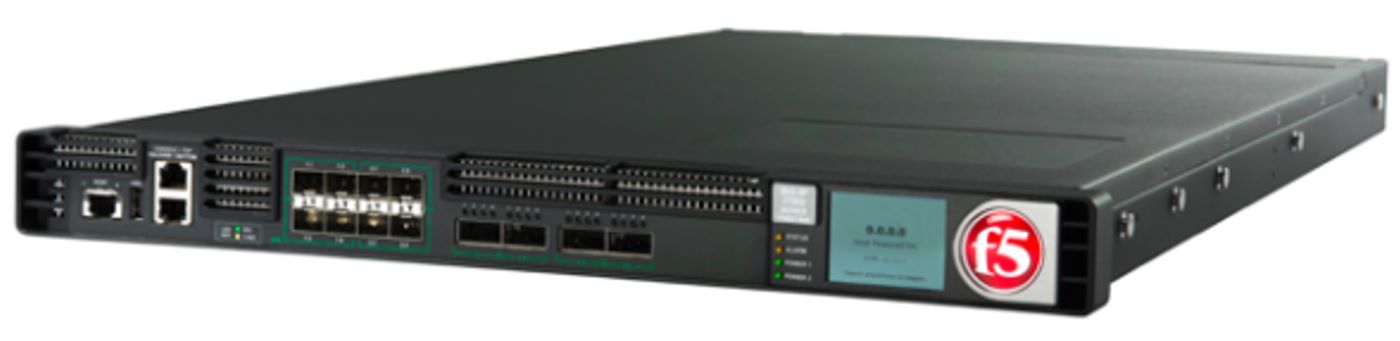
F5 provides web application and API protection by converging several defenses—WAF, API security, bot management and DDoS mitigation—into an integrated WAAP offering that is part of its broader Application Delivery and Security Platform. The aim is to reduce the tool sprawl and management overhead that come from running separate point products across on-premises, cloud and edge environments.protections through multiple form factors, including F5 Distributed Cloud (SaaS), BIG-IP Advanced WAF and WAF for NGINX, so teams can apply consistent policy across hybrid and multicloud deployments.
Key features include:
- Integrated WAAP platform: Brings WAF, API security, bot management and DDoS mitigation together to reduce tool sprawl and improve policy consistency.
- Application-layer protection: Uses WAF capabilities as the core enforcement point to block common exploits and emerging application-layer attacks, including OWASP Top 10 and zero-day risks via virtual patching.
- API discovery and security: Discovers and catalogs API endpoints, baselines normal behavior, and protects APIs from development through runtime to reduce blind spots and abuse.
- Bot and automation defense: Detects and mitigates automated threats using multiple signals and applies step-up challenges only when needed to limit fraud and abuse.
- DDoS resilience: Defends against blended, multi-vector DoS and DDoS attacks across distributed architectures using a mix of on-premises and cloud mitigation.
- Continuous security assessment: Continuously assesses the external attack surface to identify exposed apps and APIs and inform prioritized remediation.
- Flexible deployment: Offers SaaS, on-premises (BIG-IP) and NGINX-based form factors for consistent protection across hybrid multicloud environments.
Limitations (as reported by users on G2):
- Complex configuration: Setup requires understanding many configuration settings and can be difficult for less-experienced administrators.
- False positives: Default configurations can generate false-positive alerts that sometimes affect legitimate traffic.
- Steep learning curve: The platform takes time to learn and tends to require a capable, dedicated administrator.
- Logging and dashboards: Some users find the log dashboard and log-search experience need improvement for troubleshooting.
- Availability concerns: A few reviewers report extended outages and would like stronger high availability.
Source: F5
3. AppTrana

Best for: Fully managed WAAP with built-in vulnerability remediation
Strengths: Managed SOC, virtual patching, DAST-fed protection
Things to consider: Reporting window and custom rules are limited
AppTrana, from Indusface, is a cloud-based WAAP platform that unifies web application firewall, API security, DAST scanning, bot mitigation and DDoS protection, with managed security services layered on top. It is designed to reduce operational overhead by discovering the attack surface, scanning for vulnerabilities, protecting applications at the edge, and remediating findings through managed virtual patching.
Onboarding is done through a DNS change, after which AppTrana discovers domains, apps, APIs and AI workloads, continuously scans them, and applies protection in block mode with 24x7 expert monitoring.
Key features include:
- Autonomous vulnerability remediation: Combines continuous DAST scanning with managed virtual patching so findings are addressed quickly and exposure windows are reduced.
- API discovery and protection: Automatically identifies APIs, including shadow and unmanaged endpoints, and applies positive security policies to them.
- Managed security operations: Provides 24x7 monitoring and rule management through a managed SOC, with experts tuning protections as attacks happen.
- Bot and DDoS mitigation: Uses behavioral and AI-driven analysis to distinguish legitimate traffic from attacks and to block credential stuffing, scraping and account-takeover attempts.
- Continuous discovery: Identifies web applications, APIs, and external-facing assets, including shadow assets, to keep attack-surface coverage current.
- Block mode from day one: Designed to run in block mode from onboarding, supported by a zero-false-positive guarantee and managed tuning.
Limitations (as reported by users on G2):
- Reporting limits: Reporting can be hard to drill into and the monitoring window is constrained, restricting historical analysis.
- Certificate management: Installing and replacing third-party certificates is reported as complex and under-documented.
- Pricing for smaller teams: Cost is a drawback for startups and when protecting multiple application instances.
- Custom rules and tuning: Custom rules need more flexibility, and reducing false positives during onboarding can take several rounds with the vendor.
- Latency in some regions: Routing through distant regions can add latency where local points of presence are unavailable.
4. SonarQube

Best for: Deep static code review integrated into CI/CD pipelines
Strengths: Taint and dataflow analysis with IDE and CI/CD feedback
Things to consider: False positives; advanced editions cost more
SonarQube, from Sonar, is a static application security testing tool that analyzes source code to find quality, reliability and security issues early in development. It emphasizes deep analysis, including taint and dataflow tracking across first-party and third-party code, to surface complex vulnerabilities that simpler static analysis can miss.
It integrates into IDEs and CI/CD pipelines to scan branches, pull requests and merges as code is committed, and can enforce quality gates that block builds failing defined standards. SonarQube is available as a managed cloud service and as a self-hosted server.
Key features include:
- Static code analysis: Applies curated rules and deep static analysis across branches and pull requests to detect bugs, code smells and security issues as code is written.
- Taint and dataflow analysis: Traces untrusted input across code and dependencies to identify issues such as SQL injection, cross-site scripting and authentication flaws.
- Quality gate enforcement: Lets teams define quality gates in CI/CD pipelines that block builds not meeting security and quality thresholds.
- Developer feedback: Integrates with IDEs and existing DevOps tools to give immediate, automated feedback during development and code review.
- AI-assisted remediation: AI CodeFix generates context-aware fix suggestions for bugs and security issues directly in the developer’s workflow.
- Flexible deployment: Offered as SonarQube Cloud (SaaS) or SonarQube Server (self-hosted), including air-gapped options for regulated environments.
Limitations (as reported by users on G2):
- Resource usage and bugs: Users report bugs and heavy memory consumption that can affect usability.
- False positives: Triaging false positives can be tedious and slow down code review.
- Complex configuration: Setup and rule tuning are challenging, particularly for less-experienced users.
- Tiered features: Some scanning and analysis capabilities are limited unless higher editions are purchased.
- Cost: Advanced features sit behind editions that users describe as expensive.
5. Semgrep

Best for: Fast, developer-first SAST with reduced noise
Strengths: Rule-based plus AI detection with in-PR remediation
Things to consider: Custom-rule syntax has a learning curve
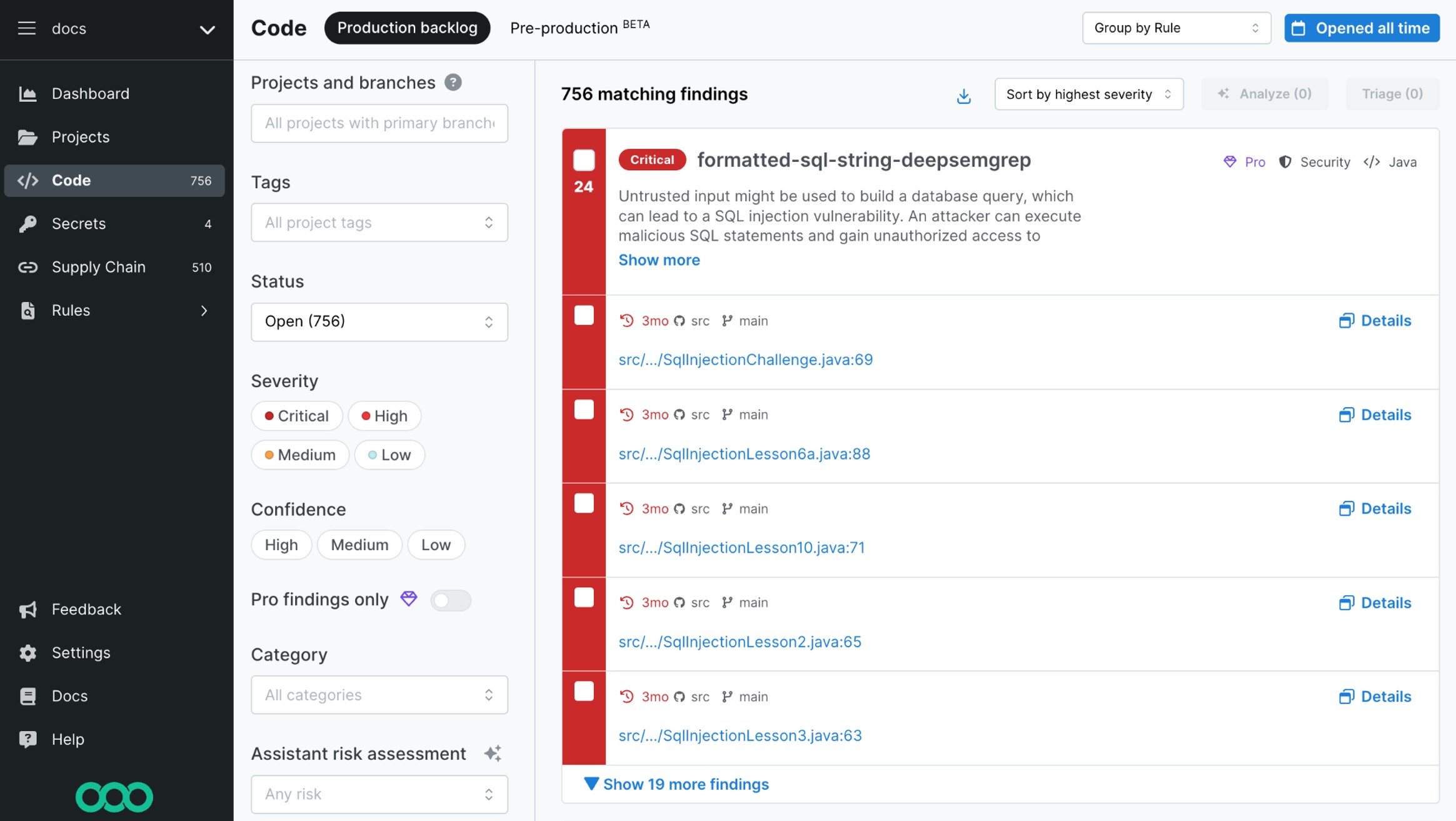
Semgrep Code is a static application security testing tool that combines rule-based static analysis with AI-driven techniques to improve accuracy and cut false positives. Its multimodal approach uses deterministic rules to catch classic issues such as cross-site scripting and SQL injection, and AI analysis to surface more complex flaws such as broken access control and business-logic vulnerabilities.
Semgrep applies organization-specific context to both rule-based and AI scans, filters out noise, and delivers step-by-step remediation guidance directly in pull requests so developers can fix issues before security teams review them.
Key features include:
- Multimodal detection: Combines deterministic rules with AI analysis to detect both common vulnerabilities and complex logic flaws in one platform.
- False-positive reduction: Uses dataflow analysis and contextual understanding to filter out irrelevant findings and improve signal quality.
- In-PR remediation: Provides tailored, step-by-step fix guidance directly in pull requests to speed up resolution.
- Organizational learning: Learns from prior triage decisions so future scans apply the same exploitability context without custom rules.
- Common vulnerability coverage: Detects issues such as SQL injection, cross-site scripting and insecure access control across first-party code.
- Workflow integration: Embeds into development pipelines for continuous testing and integrates with the wider Semgrep AppSec platform.
Limitations (as reported by users on G2):
- Learning curve: Setup and customization can be difficult for new users.
- Custom-rule syntax: Writing custom rules has a learning curve that can slow initial adoption.
- Limited guidance: Some users want clearer documentation for creating rules and interpreting findings.
- Feature breadth: A few reviewers note it may need supplementary tools for fully comprehensive coverage.
Source: Semgrep
6. Mend

Best for: SAST embedded directly in developer repositories
Strengths: Pre-commit scanning with AI-assisted fixes
Things to consider: Integrations and interface can be challenging
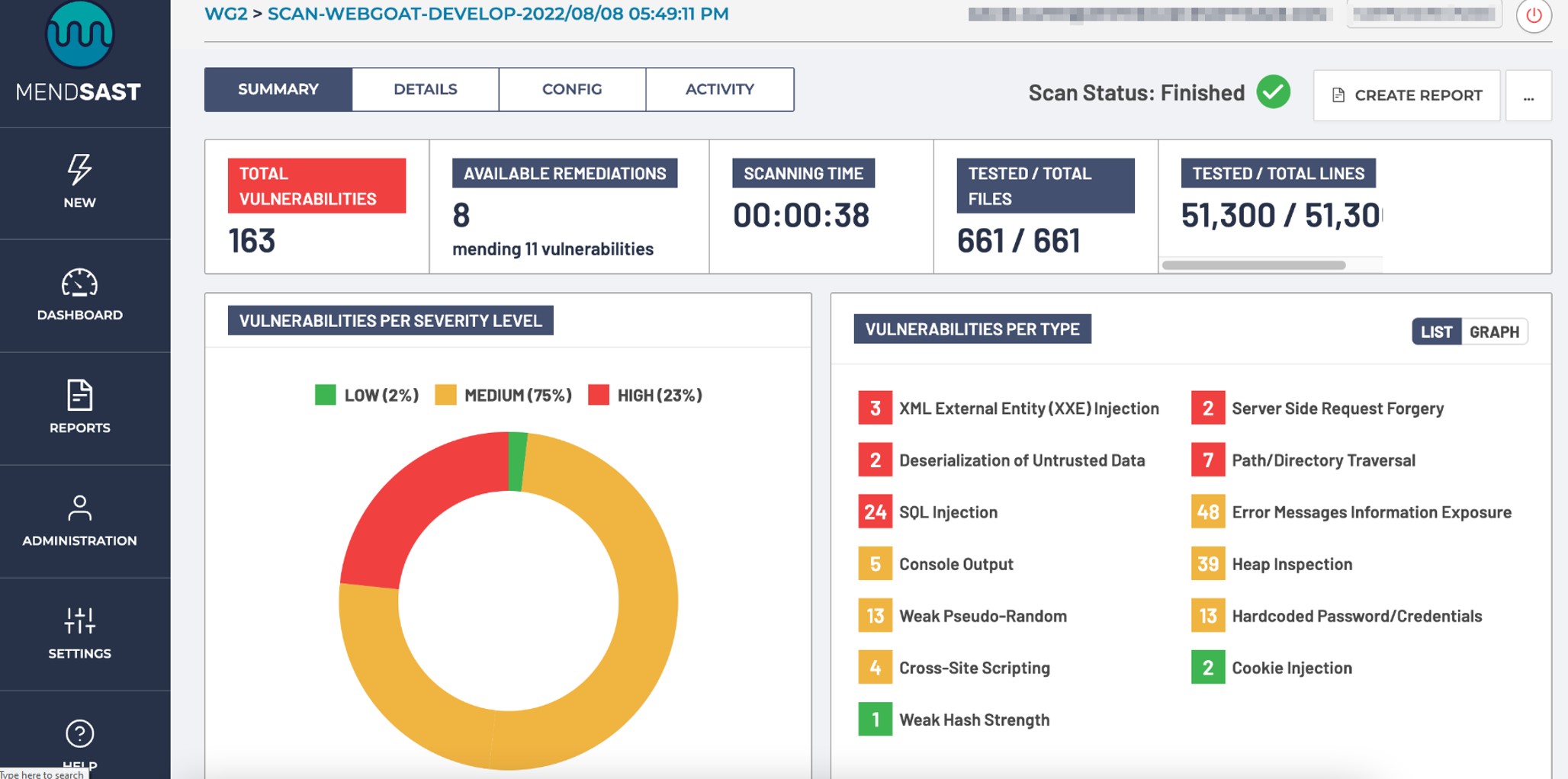
Mend SAST embeds static security testing into developer workflows to find and fix vulnerabilities in both human-written and AI-generated code. It integrates directly into repositories and developer tools, emphasizing early detection and fast feedback so issues are caught before code is committed.
Mend pairs detection with automated, AI-assisted remediation and ties findings to recent code changes, and is part of the broader Mend AppSec platform that also covers software composition analysis.
Key features include:
- Pre-commit scanning: Detects vulnerabilities before code is committed to repositories, shifting findings earlier in development.
- AI-assisted remediation: Provides automated fixes through integration with AI coding tools to speed up resolution.
- Fast feedback loop: Delivers near real-time results directly within the development environment to keep developers in flow.
- Repository-level insight: Highlights new vulnerabilities tied to recent code changes for focused review.
- Broad language support: Supports a wide range of programming languages and can scan inside the customer’s own environment.
- Platform integration: Works alongside Mend’s SCA and AppSec platform for combined coverage of proprietary and open-source code.
Limitations (as reported by users on G2):
- Integration friction: Integrations can require extra tooling or workarounds, and complex multi-project setups are challenging.
- Implementation effort: Initial onboarding and agent configuration can take time and support involvementen.
- Interface: Separate SAST and SCA portals and the dashboard are described as clunky by some users.
- False positives: Some reviewers cite findings that are not reachable or are hard to verify.
- Pricing: Cost and the pricing structure are seen as on the higher side.
Source: Mend
7. ZAP (Zed Attack Proxy)

Best for: Free, open-source dynamic testing and manual pentesting
Strengths: Intercepting proxy with active and passive scans
Things to consider: Community support; interface feels dated
Zed Attack Proxy (ZAP) is a free, open-source dynamic application security testing tool, now maintained as ZAP by Checkmarx, that is widely used to find vulnerabilities in running web applications. It works as an intercepting proxy, letting testers capture and modify HTTP traffic between the browser and the application while performing both automated and manual security testing.
ZAP supports active and passive scanning, crawling of traditional and JavaScript-heavy applications, and a large marketplace of community add-ons, and it can be automated through APIs and an automation framework for CI/CD use.
Key features include:
- Intercepting proxy: Captures and lets testers inspect and modify traffic between the browser and the application to identify vulnerabilities.
- Active and passive scanning: Performs safe passive analysis and active attack simulations to uncover vulnerabilities in running applications.
- Spidering and crawling: Includes traditional and AJAX spiders to discover content and endpoints in modern, JavaScript-heavy applications.
- Extensible add-ons: Offers a marketplace of community-contributed add-ons that extend testing capabilities, plus scripting in several languages.
- Automation and API: Provides an automation framework, command-line options and an API for integrating scans into CI/CD pipelines.
- Broad protocol and reporting support: Handles OpenAPI, SOAP, GraphQL, gRPC and WebSockets, generates SBOMs, and exports reports in formats such as HTML, JSON, XML and SARIF.
Limitations (as reported by users on G2):
- False positives: Scans can surface false-positive findings that must be validated manually.
- Sparse documentation: Some users report there is not enough documentation for handling errors and troubleshooting.
- Support model: Official support is limited, with users relying largely on the community.
- Dated interface: The interface is described as old-styled and cluttered compared with some commercial tools.
- Performance at scale: Scanning large applications can be resource-intensive and slow.
8. Rapid7 InsightAppSec
Best for: Scalable black-box testing of web apps and APIs
Strengths: Automated DAST with attack replay and DevOps integration
Things to consider: False positives; scans can be slow
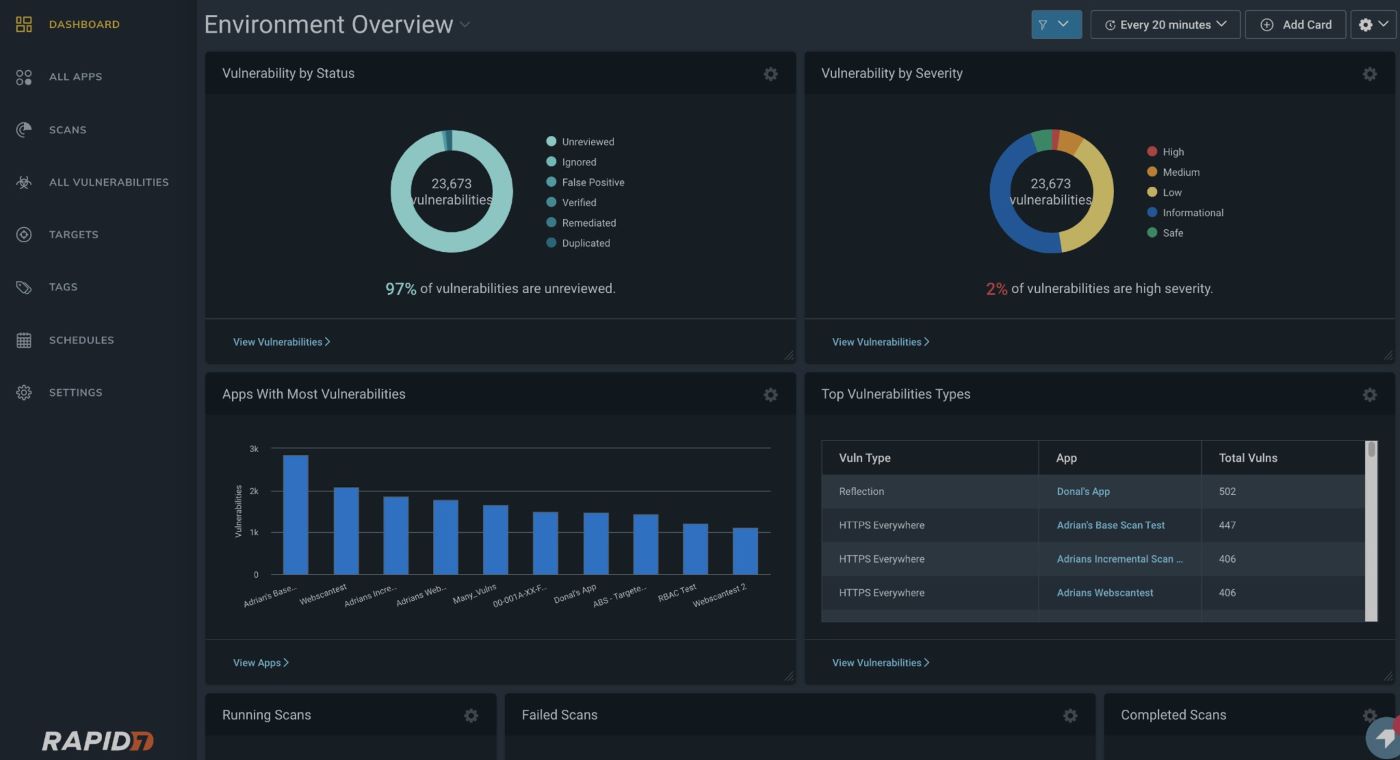
Rapid7 InsightAppSec is a dynamic application security testing solution that automates black-box testing of web applications and APIs to find vulnerabilities in running environments. It focuses on scalable assessment across large application portfolios, accurate detection with fewer false positives, and integration with development workflows to streamline remediation.
InsightAppSec includes an attack-replay capability so developers can reproduce and validate findings, and it maps results to compliance frameworks for reporting.
Key features include:
- Automated dynamic testing: Performs black-box testing to identify vulnerabilities in running web applications and APIs without source-code access.
- Attack replay: Lets developers reproduce and validate reported vulnerabilities to speed up remediation.
- Lower false positives: Aims to improve accuracy so teams focus on real risks rather than noise.
- Compliance reporting: Assesses applications against standards such as PCI-DSS, HIPAA and the OWASP Top 10.
- Scalable scanning: Manages security assessment across large application portfolios with flexible deployment options.
- DevOps integration: Integrates with tools such as Jira to coordinate work between security and development teams.
Limitations (as reported by users on G2):
- False positives: Reviewers report false positives, including flags on tests that are not actually vulnerable.
- Coverage gaps: Some users feel certain critical or high-severity vulnerabilities are not reliably detected.
- Remediation tracking: The scanner does not always mark vulnerabilities as remediated once fixed, creating manual cleanup.
- Cloud deployment: Configuring scans for applications hosted in cloud environments can be difficult.
- Scan speed: Scans against a target can take a long time.
Source: Rapid7
9. Checkmarx DAST

Best for: DAST inside CI/CD with API coverage
Strengths: Tunneling onboarding, auth-aware scans, API testing
Things to consider: Sold within Checkmarx One; pricing is complex
Checkmarx DAST is a dynamic testing tool, part of the Checkmarx One platform, that identifies vulnerabilities in live applications across the development lifecycle. It is designed to fit modern DevOps workflows, enabling continuous testing on every build and coverage of complex application environments.
It uses built-in tunneling and ready-made scan templates to onboard internal apps quickly, supports complex authentication flows for full coverage, and centralizes findings for prioritization alongside other Checkmarx results.
Key features include:
- Continuous DAST in CI/CD: Runs automated security tests on every build to catch vulnerabilities in development and pre-production before release.
- Fast onboarding: Uses built-in tunneling and pre-built scan templates so internal and external apps can be set up in minutes without complex network changes.
- Authentication-aware scanning: Records login flows in the browser and supports multi-factor authentication to achieve full coverage of authenticated surfaces.
- API security testing: Tests REST, SOAP and gRPC endpoints in live environments to surface vulnerabilities that static testing misses.
- Compliance mapping: Maps findings to regulatory frameworks to support audit readiness.
- Centralized management: Aggregates SAST and DAST findings, including API findings, in a single inventory for prioritization and remediation.
Limitations (as reported by users on PeerSpot):
- Maturing dynamic testing: Users note that dynamic testing and API security capabilities still need strengthening.
- Scan speed: Scans and builds can be slow and are not always optimized for CI/CD.
- False positives: Findings can require triage and tuning to reduce noise.
- Pricing complexity: Cost is described as high, with complex module- and usage-based licensing.
- Reporting and UI: Reporting, dashboards and the interface are areas users would like improved.
10. Acunetix
Best for: Grey-box scanning with runtime code visibility
Strengths: AcuSensor pinpoints code; broad API testing
Things to consider: Per-target licensing; deep scans can be slow
Acunetix, with its AcuSensor component, provides interactive application security testing by combining dynamic scanning with runtime instrumentation. When AcuSensor is installed, Acunetix operates as a grey-box (IAST) scanner rather than a black-box DAST scanner, gaining visibility into back-end code execution during a scan. AcuSensor works with applications written in Node.js, PHP, Java (including Spring) and ASP.NET.
This runtime visibility lets Acunetix map hidden and unlinked files, discover APIs used by the application, and pinpoint the exact line of source code or stack-trace location for many vulnerabilities, which helps developers remediate faster.
Key features include:
- Runtime code visibility: Deploys sensors inside the application to analyze back-end execution during scans, turning a dynamic scan into grey-box testing.
- Precise vulnerability location: Identifies the exact source-code line (for PHP) or stack-trace location (for Java and ASP.NET) to speed remediation.
- Full coverage of hidden files: Provides a directory listing of the application so hidden, unlinked files and inputs are discovered and tested.
- High-confidence detection: Detects certain vulnerability types—such as SQL injection, code injection and directory traversal—with high confidence.
- API testing: Imports API definitions and discovers APIs at runtime to test REST, SOAP and GraphQL endpoints.
- No source-code changes: Adds the IAST sensor to the runtime environment without requiring modification of the application’s source code.
Limitations (as reported by users on G2):
- Pricing: Licensing is seen as expensive, with recurring annual increases and limited fit for small teams.
- Per-target licensing: A scanned URL can be locked to the license for the contract term, making targets hard to swap.
- Setup complexity: Initial setup, scan configuration and integrations can be difficult for non-expert users.
- Scan performance: Deep scans of large applications can be slow and resource-intensive.
- Support and reliability: Some users report slow support and occasional scan or authenticated-login issues.
11. Black Duck Seeker

Best for: IAST with active verification and data tracking
Strengths: Verifies findings, tracks sensitive data, CI/CD fit
Things to consider: Heavy footprint; premium pricing
Black Duck Seeker is an interactive application security testing tool that analyzes web applications during runtime to identify vulnerabilities with active verification and sensitive-data tracking. It monitors application interactions in the background during normal testing, processing large volumes of HTTP requests and automatically retesting findings to confirm whether they are real and exploitable.
Seeker integrates into CI/CD and DevOps workflows through native integrations, APIs and plugins, discovers known and unknown APIs, and maps findings to compliance standards while pinpointing vulnerable lines of code.
Key features include:
- Active verification: Automatically retests identified vulnerabilities to confirm exploitability and reduce false positives.
- Sensitive-data tracking: Shows where critical information and secrets are stored without sufficient encryption to support PCI DSS and GDPR compliance.
- Real-time visibility: Monitors application interactions during normal testing and returns results quickly with near-zero false positives.
- API and microservices security: Discovers known and unknown APIs, including REST, SOAP, GraphQL and gRPC microservices, and verifies their security posture.
- CI/CD integration: Provides native integrations, web APIs and plugins to fit on-premises, cloud, microservices and container-based pipelines.
- Compliance and remediation: Maps findings to OWASP Top 10, PCI DSS, GDPR and CWE/SANS Top 25, pinpoints vulnerable code, and offers contextual remediation guidance.
Limitations (based on publicly available sources):
- Agent deployment: Agent installation can be inconsistent across some application types and environments.
- Rule customization: Predefined detection rules are reported as rigid and not always a fit for every application.
- Adaptive learning: The tool relies on static rules rather than adaptive AI/ML learning over time.
- Pricing: Pricing is premium and there is no openly available free trial.
- Deployment footprint: It requires a dedicated Seeker server in addition to agents, adding operational overhead.
12. Aikido

Best for: All-in-one AppSec across code, cloud and runtime
Strengths: SAST, SCA, DAST, secrets and runtime in one platform
Things to consider: Noisy first setup; scans slow on large repos
Aikido is a unified application security platform that brings multiple scanning capabilities into a single product spanning code, cloud and runtime. Rather than a dedicated standalone IAST agent, it combines static analysis, software composition analysis, secrets detection, infrastructure-as-code scanning, container scanning, cloud posture management, dynamic testing and runtime protection, with an emphasis on reducing false positives and noise.
Teams can start with the module they need and expand into the full platform, and Aikido adds AI-assisted autofix and continuous testing across the software development lifecycle.
Key features include:
- Unified scanning: Combines SAST, SCA, secrets detection, IaC, container and cloud scanning in one platform to reduce tool sprawl.
- Dynamic and runtime testing: Tests software against real-world exploits and adds runtime protection and threat detection to block attacks in production.
- Noise reduction: Filters findings to prioritize real, exploitable risks and reduce false-positive alerts for developers.
- AI autofix: Generates AI-assisted fixes for issues such as code and infrastructure-as-code findings in the workflow.
- Cloud posture management: Surfaces cloud misconfigurations, exposures and vulnerabilities across the cloud footprint.
- Developer-first workflow: Offers read-only onboarding, broad integrations, and workflows built for modern development teams.
Limitations (as reported by users on PeerSpot):
- Scan speed: Initial or full scans can take time on large codebases.
- Pricing: Some reviewers find the cost steep, particularly for smaller users.
- Noisy initial setup: First connection can surface a large number of findings, making early triage difficult.
- Secret-detection false positives: Benign values are occasionally misflagged as secrets.
- Remediation guidance: Users want more detailed fix instructions and more flexible alert configuration.
13. Sonatype Lifecycle

Best for: Automated open-source dependency governance
Strengths: Policy engine, contextual prioritization and SBOMs
Things to consider: Alert volume; strongest for Java ecosystems
Sonatype Lifecycle is a software composition analysis tool that automates identification and remediation of risk in open-source components. It integrates into development workflows to provide continuous visibility into dependencies, helping teams detect vulnerability, license and architectural risks early while reducing technical debt from the software supply chain.
Sonatype draws on proprietary intelligence that extends beyond public vulnerability data, prioritizes real risk using factors such as reachability, and supports automated remediation and SBOM generation across the development lifecycle.
Key features include:
- Automated dependency management: Applies fixes and updates across the lifecycle, including assisted remediation and pull requests designed not to break builds.
- Flexible policy engine: Offers default policies and many customizable constraints that can be applied by application type or risk profile and enforced continuously.
- Contextual risk prioritization: Ranks issues using reachability, breaking-change and upgrade-availability data rather than relying only on CVSS scores.
- Proprietary intelligence: Uses research that goes beyond public databases to define risks that may be missing or undefined in standard sources.
- Reporting and SBOMs: Provides enterprise reports and dashboards and can generate or import SBOMs in standard formats for visibility and compliance.
- Developer integration: Embeds insights into IDEs and source control to flag vulnerable or non-compliant components at the earliest commit.
Limitations (as reported by users on PeerSpot):
- Alert volume: Default policy and alert volume can feel excessive, especially for teams early in their security journey.
- Prioritization: Some users want better noise reduction and prioritization in large environments.
- Language coverage: Depth and language support are seen as strongest for Java ecosystems.
- Reporting interface: The reporting UI can be unintuitive for infrequent users.
- Licensing cost: Licensing is described as costly, with some uncertainty about how counts are calculated.
14. Checkmarx SCA
Best for: Open-source risk with reachability analysis
Strengths: Transitive scanning and malicious-package detection
Things to consider: Pricing; scans can be slow
Checkmarx SCA, part of the Checkmarx One platform, helps organizations manage risk in open-source components by identifying vulnerabilities, malicious packages and license issues. It integrates into development workflows and emphasizes accurate detection and prioritization based on whether vulnerable code is actually reachable.
Checkmarx SCA scans direct and transitive dependencies to unlimited depth, draws on a large proprietary database of malicious packages, and provides remediation guidance, policy automation and SBOM support.
Key features include:
- Transitive dependency scanning: Discovers and scans direct and indirect dependencies to unlimited depth, including packages in private registries.
- Reachability analysis: Prioritizes remediation by focusing on vulnerable open-source code that may actually execute, based on call-path analysis.
- Malicious package detection: Uses a large proprietary database of malicious packages to identify and remediate harmful components in the supply chain.
- Remediation guidance: Provides actionable, AI-guided fixes with the expected effort and impact of each change, and suggests safer package alternatives.
- Policy automation: Enforces policies based on severity, reachability, malicious-code detection and licensing that can alert, block pull requests or break builds.
- License and SBOM management: Tracks third-party license requirements and generates and manages SBOMs in standard formats.
Limitations (as reported by users on PeerSpot):
- Pricing: Cost is seen as high relative to some competitors.
- Scan performance: Scans can be slow and performance is described as inconsistent.
- Support: Some users report that support quality has weakened over time.
- API security gaps: API security capabilities are seen as needing strengthening.
- No impact simulation: There is no quick way to test the effect of a change without rerunning a full analysis.
15. Snyk
Best for: Developer-first open-source dependency fixes
Strengths: IDE and CI integration with risk scoring and fix PRs
Things to consider: False positives; pricing on higher tiers
Snyk is a software composition analysis tool focused on helping developers find and fix vulnerabilities and license issues in open-source dependencies throughout the development lifecycle. It integrates into IDEs, repositories, CI/CD pipelines and production environments to enable continuous scanning and monitoring.
Snyk emphasizes risk-based prioritization using a risk score that weighs factors such as reachability, exploit maturity and EPSS/CVSS, and it automates fixes through pull requests with the required upgrades and patches.
Key features include:
- Developer-first integration: Scans dependencies directly in IDEs, the CLI and source-control workflows so issues are caught as developers work.
- Continuous monitoring: Tracks projects over time and alerts on newly disclosed vulnerabilities after code is deployed.
- Risk-based prioritization: Ranks issues using a risk score that factors in reachability, exploit maturity and business or application context.
- Automated remediation: Generates one-click pull requests with upgrades and patches, using customizable templates to fit team conventions.
- CI/CD enforcement: Adds security checks to pipelines to prevent vulnerable open-source code from reaching production.
- Governance and reporting: Provides real-time and historical reporting for compliance with regulatory and internal security policies.
Limitations (as reported by users on PeerSpot):
- Documentation: Some users find documentation insufficient, which can slow troubleshooting.
- False positives: It can flag vulnerabilities that are not reachable or exploitable, creating noise to filter.
- Language and depth: Reviewers want broader language coverage and stronger scanning depth.
- Integration friction: There can be friction integrating with some IDE plugins, build tools and CI/CD systems.
- Pricing and API access: Higher tiers can be expensive and API access is limited on lower plans.
16. Radware Kubernetes WAF
Best for: Kubernetes-native application protection in CI/CD
Strengths: Scales with pods, auto-generated policies, OWASP coverage
Things to consider: Interface has a learning curve for new users
Radware Kubernetes WAF is a Kubernetes-native web application firewall for CI/CD environments orchestrated by Kubernetes. It is designed to fit these environments natively, scaling application security with Kubernetes pods and integrating with software provisioning, testing and visibility tools in the pipeline, with insight down to the pod and container levels.
The system combines signature-based and behavior-based security models to address known and zero-day threats, automatically generates granular protection policies based on application behavior, and supports both on-premise and cloud-based deployments. Radware provides NSS Labs recommended and ICSA Labs certified protection for microservices.
Key features include:
- Kubernetes-native scaling: Runs as a Kubernetes-controlled service so security grows and scales with pods and follows Kubernetes orchestration behavior.
- Hybrid security models: Combines signature-based (negative) and behavior-based (positive) detection to handle both known and zero-day threats.
- Automated policy generation: Learns application behavior and generates granular protection rules in blocking mode with minimal manual intervention.
- OWASP Top 10 coverage: Detects common web vulnerabilities including injection, cross-site scripting, CSRF and security misconfiguration out of the box.
- Data leak prevention: Identifies and blocks transmission of sensitive data such as credit card and social security numbers.
- CI/CD and observability integration: Integrates with tools such as Prometheus, Grafana and Kibana for visibility and analysis, and supports easy migration from test to production.
Limitations (based on publicly available sources):
- Learning curve: The interface can take time for new SOC users to interpret traffic and advanced configurations.
- Reporting customization: Reporting could offer more customization for SOC insights.
- Independent review coverage: As a specialized product, it has limited independent review coverage to draw on.
17. Prophaze

Best for: In-cluster, no-sidecar Layer 7 protection
Strengths: Helm deploy, AI detection, east-west coverage
Things to consider: Reporting and dashboards are limited
Prophaze provides a Kubernetes-focused web application firewall that secures traffic within clusters at the application layer. It applies inline, AI-driven Layer 7 protection to requests, routes and pods without requiring sidecars or application changes, and is designed to protect east-west service-to-service traffic that never reaches a traditional perimeter WAF.
Prophaze deploys through a native Helm chart that drops into existing manifests, works across managed and self-managed Kubernetes, and integrates with common ingress controllers and service meshes such as NGINX, Istio, Traefik and Envoy.
Key features include:
- In-cluster protection: Secures ingress and service-to-service traffic inside the cluster, where much of the risk in Kubernetes lives, without sidecars.
- AI-driven detection: Analyzes requests inline using behavioral analytics and deep inspection to detect application-layer threats.
- No-sidecar architecture: Deploys without modifying applications or adding sidecar containers, using a Helm chart that fits existing manifests.
- Deep inspection and enforcement: Inspects payloads to prevent issues such as XSS, SQL injection, RCE and file traversal, and applies adaptive rules or rate limiting in real time.
- Multi-environment support: Works consistently across EKS, AKS, GKE, OpenShift and bare-metal Kubernetes and scales across multi-cluster and hybrid estates.
- Ecosystem compatibility: Integrates with NGINX, Istio, Traefik and Envoy and supports GitOps and CI/CD-friendly rollout.
Limitations (as reported by users on G2):
- Reporting: Logs and reports can be hard to fetch from the portal, and scheduled reports are not available.
- Dashboard customization: Users want customizable dashboards and attack-type-based visibility views.
- Pricing: Pricing is flagged as an upfront concern for enterprise deployments.
- Report detail balance: Exported reports can include excessive, unnecessary detail.
- User management: Some options for non-administrative user access are missing.
18. Calico

Best for: Workload-level WAF inside Kubernetes clusters
Strengths: Ingress and east-west inspection with microsegmentation
Things to consider: Steep learning curve; needs networking skills
Calico, from Tigera, provides a workload-based web application firewall that protects Kubernetes applications from application-layer attacks inside the cluster. Unlike traditional edge-based WAFs, Calico applies controls at the workload level so it can inspect both ingress and internal service-to-service (east-west) traffic where communication actually happens.
The workload-centric WAF is part of Calico’s broader platform for Kubernetes networking and security, which also includes microsegmentation, workload-based intrusion detection and prevention, and observability of cluster traffic.
Key features include:
- Workload-level protection: Applies WAF controls directly to specific pods and deployments rather than only at the cluster edge.
- Ingress and east-west inspection: Protects both ingress and intra-cluster HTTP traffic against application-layer attacks, helping limit lateral movement.
- OWASP threat coverage: Guards workloads against common OWASP Top 10 threats such as SQL injection and cross-site scripting.
- Microsegmentation: Enforces fine-grained network controls between workloads based on environments, tiers, compliance needs or individual workloads.
- Threat detection: Adds workload-level intrusion detection and prevention using threat-intelligence feeds to monitor and block malicious traffic.
- Observability: Provides service- and workload-level visibility into traffic flows, including HTTP and DNS, for troubleshooting and incident response.
Limitations (as reported by users on G2):
- Complex setup: Installation can be daunting for those without networking or Kubernetes experience.
- Troubleshooting policies: Diagnosing network-policy behavior is difficult, especially for beginners.
- Configuration effort: Configuring Calico requires effort and networking know-how.
- Learning curve: Network policies and interface intricacies take time to learn.
- Feature gaps: Some users note limited enterprise options and no built-in service mesh.
まとめ
Application security tools are essential for identifying and mitigating risks across the entire software lifecycle, from code development to production runtime. By integrating into development workflows and adapting to evolving threats, these solutions enable teams to address vulnerabilities proactively while maintaining delivery speed. A layered approach, combining multiple tool types, helps ensure comprehensive coverage against the diverse range of application-level threats organizations face today.